Map Tap is a geography game that will challenge your knowledge of places in a world map. The main interface is a globe that you can spin and zoom in or out of to find certain places. For each question, you have to find a certain place (e.g., a city) in a definite country or state. Each round consists of five questions. Your score depends on how close you choose to the correct location.
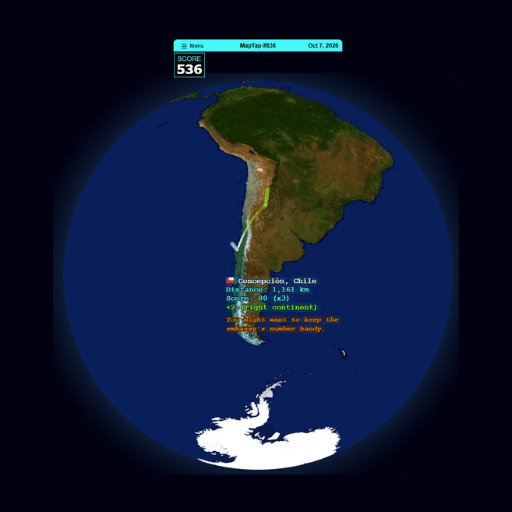
When a question appears, the game displays the name of the location you need to find (e.g., New York City or Paris, France).
Spin the globe to get to the general area. You can zoom in on the target location, so that you can see more clearly. If the cities are close together, you can zoom in to find the exact spot.
Once you have identified the likely area, tap that spot on the map. The game records your selection and reveals the result. Some questions are rated Easy with a 1x score multiplier. Since each question targets a different location, be sure to carefully read the city and region names provided.
After you submit your answer, Map Tap displays the location you selected and indicates the distance (in kilometers) between your choice and the actual location. A shorter distance yields a better result, helping you gauge whether you identified the correct area or were significantly off-target.
After five questions, the game tallies your total score for the round. You can use these results to track your geographical knowledge and accuracy over time.
After attempting the map challenges in Map Tap, you can transition the map challenges in Map Tap, and you can switch to the speed challenges in Turbo Type 3D.